

-


移动开发
站-
热门城市 全国站>
-
其他省市
-
-

 400-808-3611
 白羽
2018-06-20
来源 :网络
阅读 2053
评论 0
白羽
2018-06-20
来源 :网络
阅读 2053
评论 0
摘要:本文将带你了解微信公众号开发之下载媒体文件到个人服务器或本地, 希望本文对大家学微信有所帮助。
下载多媒体文件
公众号可调用本接口来获取多媒体文件。请注意,视频文件不支持下载,调用该接口需http协议。
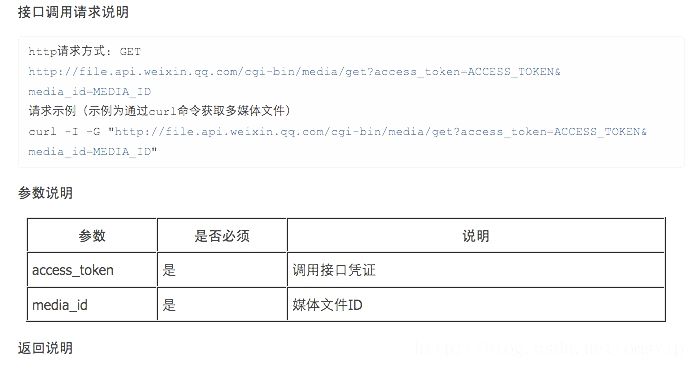
首先封装一个下载文件的类:
[java] view plain copy
1. import java.io.File;
2. import java.io.FileOutputStream;
3. import java.text.SimpleDateFormat;
4. import java.util.Date;
5. import java.util.HashMap;
6. import java.util.UUID;
7. import net.sf.json.JSONObject;
8. import xxx.Enum.EnumMethod;
9. import xxx.Pojo.MdlUpload;
10. import xxx.Pojo.Result;
11.
12. public class DownloadUtil {
13.     private static final String download_url = "https://qyapi.weixin.qq.com/cgi-bin/media/get?access_token=ACCESS_TOKEN&media_id=MEDIA_ID";
14.     private static final String upload_url = "https://qyapi.weixin.qq.com/cgi-bin/media/upload?access_token=ACCESS_TOKEN&type=TYPE";
15.     public static SimpleDateFormat Dateformat = new SimpleDateFormat("/yyyy/MM/dd/HH/mm/ss/");
16.     // 凭证无效时,保证只重做一次,不死循环
17.     private static HashMap mapRedo = new HashMap();
18.
19.     /**
20.      * 下载文件
21.      *
22.      * @param accessToken
23.      * @param media_id
24.      * @param path
25.      * @return null为成功
26.      */
27.     public static String Download(String accessToken, String media_id, String path) {
28.          String url = download_url.replace("ACCESS_TOKEN", accessToken).replace("MEDIA_ID", media_id);
29.          byte[] data = HttpRequestUtil.httpRequest_byte(url, EnumMethod.GET.name(), null);
30.          if (data.length < 100) {
31.              String s = new String(data);
32.              if (s.startsWith("{") && s.endsWith("}")) {
33.                  return s;
34.              }
35.          }
36.          try {
37.              FileOutputStream os = new FileOutputStream(path);
38.              os.write(data);
39.              os.close();
40.              return null;
41.          } catch (Exception e) {
42.              e.printStackTrace();
43.              JSONObject jsonObject = new JSONObject();
44.              jsonObject.put("assn_err_msg", "Download Exception:" + e.toString());
45.              return jsonObject.toString();
46.          }
47.      }
48.
49.     /**
50.      * 上传文件
51.      *
52.      * @param accessToken
53.      * @param type
54.      * @param file
55.      * @return
56.      */
57.     public static Result Upload(String accessToken, String type, File file) {
58.          Result result = new Result();
59.          String url = upload_url.replace("ACCESS_TOKEN", accessToken).replace("TYPE", type);
60.          JSONObject jsonObject;
61.          try {
62.              HttpPostUtil post = new HttpPostUtil(url);
63.              post.addParameter("media", file);
64.              String s = post.send();
65.              jsonObject = JSONObject.fromObject(s);
66.              if (jsonObject.containsKey("media_id")) {
67.                  MdlUpload upload=new MdlUpload();
68.                  upload.setMedia_id(jsonObject.getString("media_id"));
69.                  upload.setType(jsonObject.getString("type"));
70.                  upload.setCreated_at(jsonObject.getString("created_at"));
71.                  result.setObj(upload);
72.                  result.setErrmsg("success");
73.                  result.setErrcode("0");
74.              } else {
75.                  result.setErrmsg(jsonObject.getString("errmsg"));
76.                 result.setErrcode(jsonObject.getString("errcode"));
77.              }
78.          } catch (Exception e) {
79.              e.printStackTrace();
80.              result.setErrmsg("Upload Exception:"+e.toString());
81.          }
82.          return result;
83.      }
84.
85.     /**
86.      * 根据URL下载文件
87.      *
88.      * @param basePath
89.      *            上传文件服务器地址
90.      * @param url
91.      *            文件URL
92.      * @param type
93.      *            文件类型
94.      * @param extensionName
95.      *            扩展名
96.      * @return
97.      */
98.     public static Result DownloadCommon(String basePath, String url, String type, String extensionName) {
99.          Result result = new Result();
100.          Date d = new Date();
101.          String vPath = "/wx/" + type + Dateformat.format(d);
102.          String fileName = UUID.randomUUID().toString().replace("-", "") + "." + extensionName;
103.          String pPath = basePath + vPath;
104.          pPath = pPath.replace('\\', File.separatorChar);
105.          pPath = pPath.replace('/', File.separatorChar);
106.          File dirFile = new File(pPath);
107.          dirFile.mkdirs();
108.          pPath += fileName;
109.          vPath += fileName;
110.          String s = null;
111.          [] data = HttpRequestUtil.httpRequest_byte(url, EnumMethod.GET.name(), null);
112.          if (data == null || data.length == 0) {
113.               s = "下载失败";
114.           } else {
115.             try {
116.                  FileOutputStream os = new FileOutputStream(pPath);
117.                  os.write(data);
118.                  os.close();
119.               catch (Exception e) {
120.                  e.printStackTrace();
121.                  s = e.toString();
122.
123.           }
124.           if (s == null) {
125.               System.out.println("pPath="+pPath);
126.              result.setObj(vPath);
127.              return result;
128.         }
129.          result.setErrmsg(s);
130.          return result;
131.       }
132.
EnumMethod.class
[java] view plain copy
1. package xxx.Enum;
2.
3. public enum EnumMethod {
4.      GET,POST;
5. }
MdlUpload.class
[java] view plain copy
1. public class MdlUpload {
2.     private String type;
3.     private String media_id;
4.     private String created_at;
5.     public String getType() {
6.         return type;
7.     }
8.     public void setType(String type) {
9.         this.type = type;
10.     }
11.     public String getMedia_id() {
12.         return media_id;
13.     }
14.     public void setMedia_id(String mediaId) {
15.         media_id = mediaId;
16.     }
17.     public String getCreated_at() {
18.         return created_at;
19.     }
20.     public void setCreated_at(String createdAt) {
21.         created_at = createdAt;
22.     }
23.     public MdlUpload() {
24.         super();
25.     }
26.     @Override
27.     public String toString() {
28.         return "MdlUpload [created_at=" + created_at + ", media_id=" + media_id + ", type=" + type + "]";
29.     }
30.
31.
32. }
最后在抽取一个调用类,使用简洁:
[html] view plain copy
1. import java.io.File;
2.
3. import xxx.MdlUpload;
4. import xxx.Pojo.Result;
5.
6. /**
7.  * 微信号文件操作类
8.  *
9.  * @author Sunlight
10.  *
11.  */
12. public class FileUtil {
13.     /**
14.      * 下载文件
15.      * @param media_id 媒体Id
16.      * @param path 路径
17.      * @return
18.      */
19.     public static String Download(String token,String media_id, String path) {
20.          return DownloadUtil.Download(token, media_id, path);
21.      }
22.
23.     /**
24.      * 上传文件
25.      * @param type
26.      * @param file
27.      * @return
28.      */
29.     public static Result Upload(String token,String type, File file) {
30.          return DownloadUtil.Upload(token, type, file);
31.      }
32.
33.     /**
34.      * 下载文件
35.      * @param basePath
36.      * @param url
37.      * @param type
38.      * @param extensionName
39.      * @return
40.      */
41.     public static Result DownloadCommon(String basePath, String url, String type, String extensionName){
42.          return DownloadUtil.DownloadCommon(basePath, url, type, extensionName);
43.     }
44.
45. }
测试下载文件方法:
[java] view plain copy
1.         private static String token;
2.     static {
3.                 token = Wechat.Util.getAccessToken("appid", "appSecret").getToken();//此处调用获取AccessToken的方法
4.         System.out.println("token=" + token);
5.      }
6.
7.     @Test
8.      public void testDownload() {
9.         // path =="" 表示下载成功
10.           String path = FileUtil.Download(token, "1LatptxLLGpJDUCvTaSFpyX_0ixELCp2AQzj3oryIEr4qJp9zRTfVr5j_Co1XJbPmhRNS34eRXX-PZxLWUyDXHg", "E:\\aaa.jpg");
11.           System.out.println("path=" + path);
12.     }
13.
14.     @Test
15.     public void testUpload() {
16.         File file = new File("E:\\xxx.mp3");
17.         System.err.println(file.getName());
18.         Result result = FileUtil.Upload(token, EnumMessageType.voice.name(), file);
19.         System.out.println("Errcode=" + result.getErrcode() + "\tErrmsg=" + result.getErrmsg());
20.         System.out.println(result.getObject().toString());
21.     }
22.
23.     @Test
24.     public void testDownloadCommon() {
25.         String basePath="/\\192.168.1.111\\FilesPath";
26.         Result result=FileUtil.DownloadCommon(basePath,   "//wx.qlogo.cn/mmhead/Q3auHgzwzM67JZASQrxTwcpzZccSBvG3U9uIHgUJP26SibMUEH3ymwg/0","image", "jpg");
27.         System.out.println("errCode="+result.getErrcode()+"\t\tmsg="+result.getErrmsg());
28.         System.err.println("path="+result.getObject());
29.     }
本文由职坐标整理并发布,希望对同学们有所帮助。了解更多详情请关注职坐标移动开发之微信频道!
 喜欢 | 0
 不喜欢 | 0


您输入的评论内容中包含违禁敏感词
我知道了

请输入正确的手机号码
请输入正确的验证码
您今天的短信下发次数太多了,明天再试试吧!
我们会在第一时间安排职业规划师联系您!
您也可以联系我们的职业规划师咨询:

版权所有 职坐标-一站式AI+学习就业服务平台 沪ICP备13042190号-4
上海海同信息科技有限公司 Copyright ©2015 www.zhizuobiao.com,All Rights Reserved.
 沪公网安备 31011502005948号







 资料领取
资料领取

 答疑解惑
答疑解惑

 技术交流
技术交流

 职业测评
职业测评

 面试技巧
面试技巧

 高薪秘笈
高薪秘笈




