

-


移动开发
站-
热门城市 全国站>
-
其他省市
-
-

 400-808-3611
 白羽
2018-06-20
来源 :网络
阅读 2392
评论 0
白羽
2018-06-20
来源 :网络
阅读 2392
评论 0
摘要:本文将带你了解微信公众号开发之上传媒体文件,希望本文对大家学微信有所帮助。
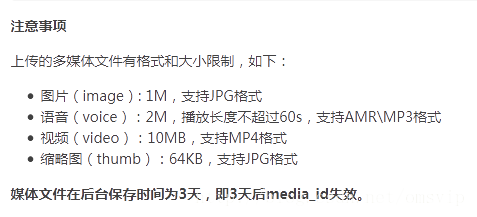
公众号在使用接口时,对多媒体文件、多媒体消息的获取和调用等操作,是通过media_id来进行的。通过本接口,公众号可以上传或下载多媒体文件。但请注意,每个多媒体文件(media_id)会在上传、用户发送到微信服务器3天后自动删除,以节省服务器资源。
公众号可调用本接口来上传图片、语音、视频等文件到微信服务器,上传后服务器会返回对应的media_id,公众号此后可根据该media_id来获取多媒体。请注意,media_id是可复用的,调用该接口需http协议。
接口调用请求说明
[plain] view plain copy
1. http请求方式: POST/FORM
2. //file.api.weixin.qq.com/cgi-bin/media/upload?access_token=ACCESS_TOKEN&type=TYPE
3. 调用示例(使用curl命令,用FORM表单方式上传一个多媒体文件):
4. curl -F media=@test.jpg "//file.api.weixin.qq.com/cgi-bin/media/upload?access_token=ACCESS_TOKEN&type=TYPE"
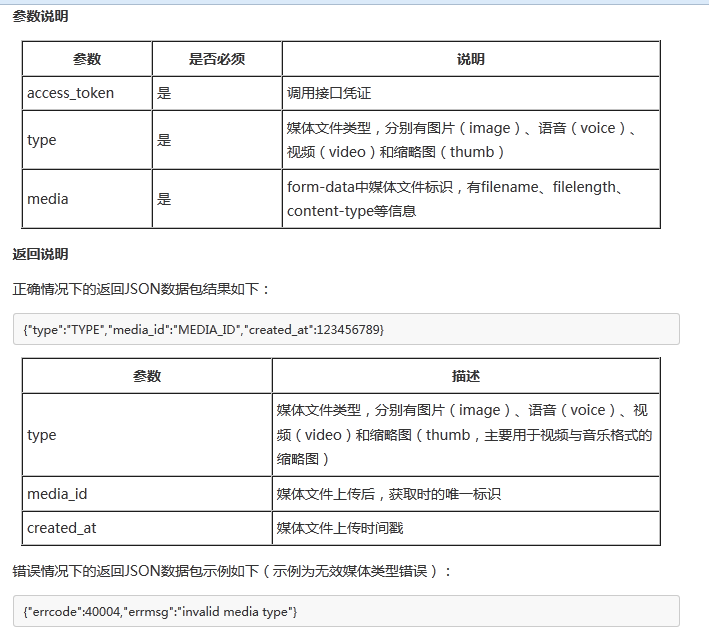
首先封装一个HttpPostUtil类,专门负责文件上传请求及一些参数的设置(此处可以理解为上传文件表单参数设置和connection的一些必须设置)、字符编码,文件类型等。
HttpPostUtil类代码:
[java] view plain copy
1. import java.io.ByteArrayOutputStream;
2. import java.io.DataOutputStream;
3. import java.io.File;
4. import java.io.FileInputStream;
5. import java.io.InputStream;
6. import java.net.HttpURLConnection;
7. import java.net.URL;
8. import java.net.URLEncoder;
9. import java.util.HashMap;
10. import java.util.Iterator;
11. import java.util.Set;
12.
13. /**
14.  *
15.  * @author Sunlight
16.  *
17.  */
18. public class HttpPostUtil {
19.     private URL url;
20.     private HttpURLConnection conn;
21.     private String boundary = "--------httppost123";
22.     private HashMap<String, String> textParams = new HashMap<String, String>();
23.     private HashMap<String, File> fileparams = new HashMap<String, File>();
24.     private DataOutputStream outputStream;
25.
26.     public HttpPostUtil(String url) throws Exception {
27.         this.url = new URL(url);
28.     }
29.
30.     /**
31.      * 重新设置要请求的服务器地址,即上传文件的地址。
32.      *
33.      * @param url
34.      * @throws Exception
35.      */
36.     public void setUrl(String url) throws Exception {
37.         this.url = new URL(url);
38.     }
39.
40.     /**
41.      * 增加一个普通字符串数据到form表单数据中
42.      *
43.      * @param name
44.      * @param value
45.      */
46.     public void addParameter(String name, String value) {
47.         textParams.put(name, value);
48.     }
49.
50.     /**
51.      * 增加一个文件到form表单数据中
52.      *
53.      * @param name
54.      * @param value
55.      */
56.     public void addParameter(String name, File value) {
57.         fileparams.put(name, value);
58.     }
59.
60.     /**
61.      * 清空所有已添加的form表单数据
62.      */
63.     public void clearAllParameters() {
64.         textParams.clear();
65.         fileparams.clear();
66.     }
67.
68.     /**
69.      * 发送数据到服务器,返回一个字节包含服务器的返回结果的数组
70.      *
71.      * @return
72.      * @throws Exception
73.      */
74.     public String send() throws Exception {
75.         initConnection();
76.         conn.connect();
77.         outputStream = new DataOutputStream(conn.getOutputStream());
78.         writeFileParams();
79.         writeStringParams();
80.         paramsEnd();
81.         int code = conn.getResponseCode();
82.         if (code == 200) {
83.             InputStream in = conn.getInputStream();
84.             ByteArrayOutputStream out = new ByteArrayOutputStream();
85.             byte[] buf = new byte[1024 * 8];
86.             int len;
87.             while ((len = in.read(buf)) != -1) {
88.                 out.write(buf, 0, len);
89.             }
90.             conn.disconnect();
91.             String s = new String(out.toByteArray(), "utf-8");
92.             return s;
93.         }
94.         return null;
95.     }
96.
97.     /**
98.      * 文件上传的connection的一些必须设置
99.      *
100.      * @throws Exception
101.      */
102.     private void initConnection() throws Exception {
103.         conn = (HttpURLConnection) this.url.openConnection();
104.         conn.setDoOutput(true);
105.         conn.setUseCaches(false);
106.         conn.setConnectTimeout(10000); // 连接超时为10秒
107.         conn.setRequestMethod("POST");
108.         conn.setRequestProperty("Content-Type", "multipart/form-data; boundary=" + boundary);
109.     }
110.
111.     /**
112.      * 普通字符串数据
113.      *
114.      * @throws Exception
115.      */
116.     private void writeStringParams() throws Exception {
117.         Set<String> keySet = textParams.keySet();
118.         for (Iterator<String> it = keySet.iterator(); it.hasNext();) {
119.             String name = it.next();
120.             String value = textParams.get(name);
121.             outputStream.writeBytes("--" + boundary + "\r\n");
122.             outputStream.writeBytes("Content-Disposition: form-data; name=\"" + name + "\"\r\n");
123.             outputStream.writeBytes("\r\n");
124.             outputStream.writeBytes(encode(value) + "\r\n");
125.         }
126.     }
127.
128.     /**
129.      * 文件数据
130.      *
131.      * @throws Exception
132.      */
133.     private void writeFileParams() throws Exception {
134.         Set<String> keySet = fileparams.keySet();
135.         for (Iterator<String> it = keySet.iterator(); it.hasNext();) {
136.             String name = it.next();
137.             File value = fileparams.get(name);
138.             outputStream.writeBytes("--" + boundary + "\r\n");
139.             outputStream.writeBytes("Content-Disposition: form-data; name=\"" + name + "\"; filename=\"" + encode(value.getName()) + "\"\r\n");
140.             outputStream.writeBytes("Content-Type: " + getContentType(value) + "\r\n");
141.             outputStream.writeBytes("\r\n");
142.             outputStream.write(getBytes(value));
143.             outputStream.writeBytes("\r\n");
144.         }
145.     }
146.
147.     /**
148.      * 获取文件的上传类型,图片格式为image/png,image/jpeg等。非图片为application /octet-stream
149.      *
150.      * @param f
151.      * @return
152.      * @throws Exception
153.      */
154.     private String getContentType(File f) throws Exception {
155.         return "application/octet-stream";
156.     }
157.
158.     /**
159.      * 把文件转换成字节数组
160.      *
161.      * @param f
162.      * @return
163.      * @throws Exception
164.      */
165.     private byte[] getBytes(File f) throws Exception {
166.         FileInputStream in = new FileInputStream(f);
167.         ByteArrayOutputStream out = new ByteArrayOutputStream();
168.         byte[] b = new byte[1024];
169.         int n;
170.         while ((n = in.read(b)) != -1) {
171.             out.write(b, 0, n);
172.         }
173.         in.close();
174.         return out.toByteArray();
175.     }
176.
177.     /**
178.      * 添加结尾数据
179.      *
180.      * @throws Exception
181.      */
182.     private void paramsEnd() throws Exception {
183.         outputStream.writeBytes("--" + boundary + "--" + "\r\n");
184.         outputStream.writeBytes("\r\n");
185.     }
186.
187.     /**
188.      * 对包含中文的字符串进行转码,此为UTF-8。服务器那边要进行一次解码
189.      *
190.      * @param value
191.      * @return
192.      * @throws Exception
193.      */
194.     private String encode(String value) throws Exception {
195.         return URLEncoder.encode(value, "UTF-8");
196.     }
197. }
上传测试方法(可以在自己项目中上传文件到一些第三方提供的平台):
[java] view plain copy
1. /**
2.  * 使用方法示例
3.  * 此方法需要修改成自己上传地址才可上传成功
4.  * @param args
5.  * @throws Exception
6.  */
7. public static void test(String[] args) throws Exception {
8.     File file=new File("D\\up.jpg");
9.     //此处修改为自己上传文件的地址
10.     HttpPostUtil post = new HttpPostUtil("//www.omsdn.cn");
11.     //此处参数类似 curl -F media=@test.jpg
12.     post.addParameter("media", file);
13.     post.send();
14. }

上传文件方法封装好后,微信公众号上传文件类调用,此处需要JSON包(json-lib-2.2.3-jdk13.jar):
[java] view plain copy
1. import java.io.File;
2. import cn.<span style="font-family:FangSong_GB2312;">xx</span>.wechat.model.MdlUpload;
3. import cn.<span style="font-family:FangSong_GB2312;">xx</span>.wechat.model.Result;
4. import net.sf.json.JSONObject;
5. /**
6.  *
7.  * @author Sunlight
8.  *
9.  */
10. public class FileUpload {
11.     private static final String upload_url = "https://qyapi.weixin.qq.com/cgi-bin/media/upload?access_token=ACCESS_TOKEN&type=TYPE";
12.
13.     /**
14.      * 上传文件
15.      *
16.      * @param accessToken
17.      * @param type
18.      * @param file
19.      * @return
20.      */
21.     public static Result<MdlUpload> Upload(String accessToken, String type, File file) {
22.         Result<MdlUpload> result = new Result<MdlUpload>();
23.         String url = upload_url.replace("ACCESS_TOKEN", accessToken).replace("TYPE", type);
24.         JSONObject jsonObject;
25.         try {
26.             HttpPostUtil post = new HttpPostUtil(url);
27.             post.addParameter("media", file);
28.             String s = post.send();
29.             jsonObject = JSONObject.fromObject(s);
30.             if (jsonObject.containsKey("media_id")) {
31.                 MdlUpload upload=new MdlUpload();
32.                 upload.setMedia_id(jsonObject.getString("media_id"));
33.                 upload.setType(jsonObject.getString("type"));
34.                 upload.setCreated_at(jsonObject.getString("created_at"));
35.                 result.setObj(upload);
36.                 result.setErrmsg("success");
37.                 result.setErrcode("0");
38.             } else {
39.                 result.setErrmsg(jsonObject.getString("errmsg"));
40.                 result.setErrcode(jsonObject.getString("errcode"));
41.             }
42.         } catch (Exception e) {
43.             e.printStackTrace();
44.             result.setErrmsg("Upload Exception:"+e.toString());
45.         }
46.         return result;
47.     }
48. }
调用方法需要引用2个Model类(返回结果类和上传文件类型类):
返回结果类:
[java] view plain copy
1. package cn.<span style="font-family:FangSong_GB2312;">xx</span>.wechat.model;
2.
3. public class Result<T> {
4.     private T obj;
5.     private String errcode;
6.     private String errmsg;
7.     public T getObj() {
8.         return obj;
9.     }
10.     public void setObj(T obj) {
11.         this.obj = obj;
12.     }
13. <span style="font-family:FangSong_GB2312;">        </span>public String getErrcode() {
14.         return errcode;
15.     }
16.      public void setErrcode(String errcode) {
17.          this.errcode = errcode;
18.      }
19.     public String getErrmsg() {
20.          return errmsg;
21.     }
22.     public void setErrmsg(String errmsg) {
23.          this.errmsg = errmsg;
24.     }
25.
26. }
文件上传返回文件类型类:
[java] view plain copy
1. package cn.<span style="font-family:FangSong_GB2312;">xx</span>.wechat.model;
2.
3. public class MdlUpload {
4.     private String type;
5.     private String media_id;
6.     private String created_at;
7.     public String getType() {
8.         return type;
9.     }
10.       public void setType(String type) {
11.          this.type = type;
12.       }
13.     public String getMedia_id() {
14.           return media_id;
15.     }
16.      public void setMedia_id(String mediaId) {
17.           media_id = mediaId;
18.     }
19.     public String getCreated_at() {
20.           return created_at;
21.       }
22.      public void setCreated_at(String createdAt) {
23.           created_at = createdAt;
24.     }
25.       public MdlUpload() {
26.          super();
27.      }
28.     @Override
29.     public String toString() {
30.         return "MdlUpload [created_at=" + created_at + ", media_id=" + media_id + ", type=" + type + "]";
31.      }
32.
33.
34. }
最后微信上传文件测试方法:
[java] view plain copy
1. @Test
2.     public void testUpload() {
3.         File file=new File("E:\\Tulips.jpg");
4.         System.err.println(file.getName());
5.         Result<MdlUpload> result=FileUpload .Upload("image", file);
6.         System.out.println("Errcode="+result.getErrcode()+"\tErrmsg="+result.getErrmsg());
7.         System.out.println(result.getObj().toString());
8.     }
测试结果:

本文由职坐标整理并发布,希望对同学们有所帮助。了解更多详情请关注职坐标移动开发之微信频道!
 喜欢 | 0
 不喜欢 | 0


您输入的评论内容中包含违禁敏感词
我知道了

请输入正确的手机号码
请输入正确的验证码
您今天的短信下发次数太多了,明天再试试吧!
我们会在第一时间安排职业规划师联系您!
您也可以联系我们的职业规划师咨询:

版权所有 职坐标-一站式AI+学习就业服务平台 沪ICP备13042190号-4
上海海同信息科技有限公司 Copyright ©2015 www.zhizuobiao.com,All Rights Reserved.
 沪公网安备 31011502005948号







 资料领取
资料领取

 答疑解惑
答疑解惑

 技术交流
技术交流

 职业测评
职业测评

 面试技巧
面试技巧

 高薪秘笈
高薪秘笈




