

-


移动开发
站-
热门城市 全国站>
-
其他省市
-
-

 400-808-3611
 白羽
2018-06-26
来源 :网络
阅读 3304
评论 0
白羽
2018-06-26
来源 :网络
阅读 3304
评论 0
摘要:本文将带你了解微信小程序开发之顶部导航栏,希望本文对大家学微信有所帮助。
需求:顶部导航栏
效果图:
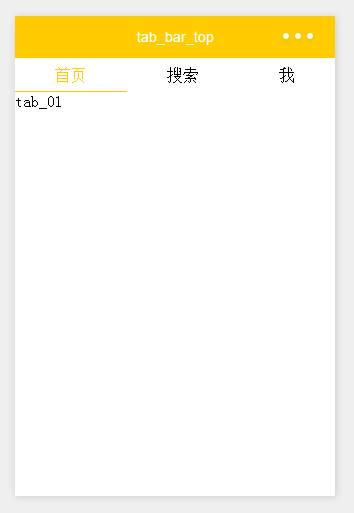
wxml:
[html] view plain copy print?
1. <!--导航条-->
2. <view class="navbar">
3.   <text wx:for="{{navbar}}" data-idx="{{index}}" class="item {{currentTab==index ? 'active' : ''}}" wx:key="unique" bindtap="navbarTap">{{item}}</text>
4. </view>
5.
6. <!--首页-->
7. <view hidden="{{currentTab!==0}}">
8.   tab_01
9. </view>
10.
11. <!--搜索-->
12. <view hidden="{{currentTab!==1}}">
13.   tab_02
14. </view>
15.
16. <!--我-->
17. <view hidden="{{currentTab!==2}}">
18.   tab_03
19. </view>

wxss:
[css] view plain copy print?
1. page{
2.   display: flex;
3.   flex-direction: column;
4.   height: 100%;
5. }
6. .navbar{
7.   flex: none;
8.   display: flex;
9.   background: #fff;
10. }
11. .navbar .item{
12.   position: relative;
13.   flex: auto;
14.   text-align: center;
15.   line-height: 80rpx;
16. }
17. .navbar .item.active{
18.   color: #FFCC00;
19. }
20. .navbar .item.active:after{
21.   content: "";
22.   display: block;
23.   position: absolute;
24.   bottom: 0;
25.   left: 0;
26.   right: 0;
27.   height: 4rpx;
28.   background: #FFCC00;
29. }

js:
[javascript] view plain copy print?
1. var app = getApp()
2. Page({
3.   data: {
4.     navbar: ['首页', '搜索', '我'],
5.     currentTab: 0
6.   },
7.   navbarTap: function(e){
8.     this.setData({
9.       currentTab: e.currentTarget.dataset.idx
10.     })
11.   }
12. })
运行:
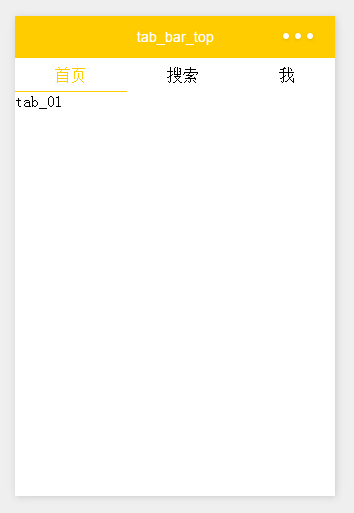
本文由职坐标整理并发布,希望对同学们有所帮助。了解更多详情请关注职坐标移动开发之微信频道!
 喜欢 | 0
 不喜欢 | 0


您输入的评论内容中包含违禁敏感词
我知道了

请输入正确的手机号码
请输入正确的验证码
您今天的短信下发次数太多了,明天再试试吧!
我们会在第一时间安排职业规划师联系您!
您也可以联系我们的职业规划师咨询:

版权所有 职坐标-一站式AI+学习就业服务平台 沪ICP备13042190号-4
上海海同信息科技有限公司 Copyright ©2015 www.zhizuobiao.com,All Rights Reserved.
 沪公网安备 31011502005948号







 资料领取
资料领取

 答疑解惑
答疑解惑

 技术交流
技术交流

 职业测评
职业测评

 面试技巧
面试技巧

 高薪秘笈
高薪秘笈




