

-


移动开发
站-
热门城市 全国站>
-
其他省市
-
-

 400-808-3611
 白羽
2018-06-26
来源 :网络
阅读 3817
评论 0
白羽
2018-06-26
来源 :网络
阅读 3817
评论 0
摘要:本文将带你了解微信小程序开发之自定义轮播图实例,希望本文对大家学微信有所帮助。
轮播图是大部分应用的一个常用的功能,常用于广告投放、产品展示、活动展示等等。
漂亮的轮播图效果可以吸引用户的点击,达到推广产品的作用。
废话少说,下面开始动手。
业务需求:
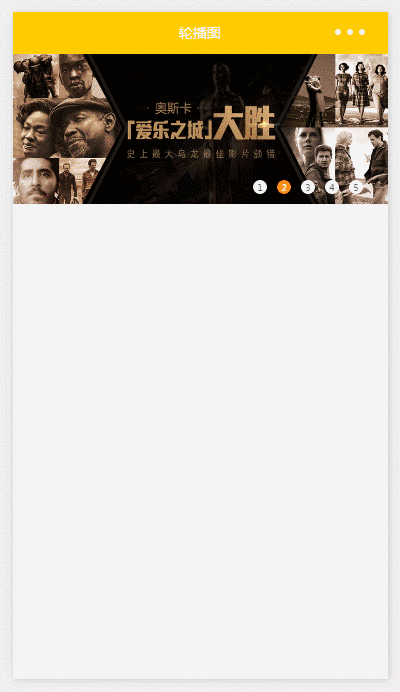
5个图片轮番播放,可以左右滑动,点击指示点可以切换图片
重点说明:
由于微信小程序,整个项目编译后的大小不能超过1M

查看做轮播图功能的一张图片大小都已经有100+k了
那么我们可以把图片放在服务器上,发送请求来获取。
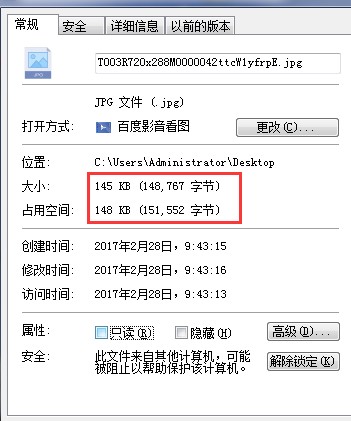
index.wxml:
这里使用小程序提供的<swiper>组件
autoplay:自动播放
interval:自动切换时间
duration:滑动动画的时长
current:当前所在的页面
bindchange:current 改变时会触发 change 事件
由于<swiper>组件提供的指示点样式比较单一,另外再自定义指示点的样式
[html] view plain copy print?
1. <view class="recommend" >
2.   <view class="swiper-container">
3.     <swiper autoplay="auto" interval="5000" duration="500" current="{{swiperCurrent}}" bindchange="swiperChange" class="swiper">
4.       <block wx:for="{{slider}}" wx:key="unique">
5.         <swiper-item data-id="{{item.id}}" data-url="{{item.linkUrl}}">
6.           <image src="{{item.picUrl}}" class="img"></image>
7.         </swiper-item>
8.       </block>
9.     </swiper>
10.     <view class="dots">
11.       <block wx:for="{{slider}}" wx:key="unique">
12.         <view class="dot{{index == swiperCurrent ? ' active' : ''}}" bindtap="chuangEvent" id="{{index}}">{{index+1}}</view>
13.       </block>
14.     </view>
15.   </view>
16. </view>

index.wxss:
[css] view plain copy print?
1. .swiper-container{
2.   position: relative;
3. }
4. .swiper-container .swiper{
5.   height: 300rpx;
6. }
7. .swiper-container .swiper .img{
8.   width: 100%;
9.   height: 100%;
10. }
11. .swiper-container .dots{
12.   position: absolute;
13.   right: 40rpx;
14.   bottom: 20rpx;
15.   display: flex;
16.   justify-content: center;
17. }
18. .swiper-container .dots .dot{
19.   margin: 0 10rpx;
20.   width: 28rpx;
21.   height: 28rpx;
22.   background: #fff;
23.   border-radius: 50%;
24.   transition: all .6s;
25.   font: 300 18rpx/28rpx "microsoft yahei";
26.   text-align: center;
27. }
28. .swiper-container .dots .dot.active{
29.   background: #f80;
30.   color:#fff;
31. }

index.js:
[javascript] view plain copy print?
1. //导入js
2. var util = require('../../utils/util.js')
3. Page({
4.   data: {
5.     slider: [],
6.     swiperCurrent: 0
7.   },
8.   onLoad: function () {
9.     var that = this;
10. //网络访问,获取轮播图的图片
11.     util.getRecommend(function(data){
12.       that.setData({
13.         slider: data.data.slider
14.       })
15.     });
16.   },
17.   //轮播图的切换事件
18.   swiperChange: function(e){
19. //只要把切换后当前的index传给<swiper>组件的current属性即可
20.     this.setData({
21.       swiperCurrent: e.detail.current
22.     })
23.   },
24.   //点击指示点切换
25.   chuangEvent: function(e){
26.     this.setData({
27.       swiperCurrent: e.currentTarget.id
28.     })
29.   }
30. })

utils.js:
[javascript] view plain copy print?
1. //网络访问
2. function getRecommend(callback) {
3.   wx.request({
4.     url: 'https://c.y.qq.com/musichall/fcgi-bin/fcg_yqqhomepagerecommend.fcg',
5.     data: {
6.       g_tk: 5381,
7.       uin: 0,
8.       format: 'json',
9.       inCharset: 'utf-8',
10.       outCharset: 'utf-8',
11.       notice: 0,
12.       platform: 'h5',
13.       needNewCode: 1,
14.       _: Date.now()
15.     },
16.     method: 'GET',
17.     header: {'content-Type': 'application/json'},
18.     success: function(res){
19.       if(res.statusCode == 200){
20.         callback(res.data);
21.       }
22.     }
23.   })
24. }
25.
26. module.exports = {
27.   getRecommend: getRecommend
28. }
运行:
 喜欢 | 3
 不喜欢 | 0


您输入的评论内容中包含违禁敏感词
我知道了

请输入正确的手机号码
请输入正确的验证码
您今天的短信下发次数太多了,明天再试试吧!
我们会在第一时间安排职业规划师联系您!
您也可以联系我们的职业规划师咨询:

版权所有 职坐标-一站式AI+学习就业服务平台 沪ICP备13042190号-4
上海海同信息科技有限公司 Copyright ©2015 www.zhizuobiao.com,All Rights Reserved.
 沪公网安备 31011502005948号







 资料领取
资料领取

 答疑解惑
答疑解惑

 技术交流
技术交流

 职业测评
职业测评

 面试技巧
面试技巧

 高薪秘笈
高薪秘笈




